The free POS for every retail shop
NodeDR POS is a free, open-source Point of Sale that works anywhere in the world. Barcode scanning, tax billing, thermal printing, loyalty points, returns — all on your own machine. No internet, no subscription, no data ever leaves your store.
Requires Docker. Runs on Linux, macOS, Windows.
12+
Core features
₹0
Forever free
MIT
Open license
<10 min
Setup time
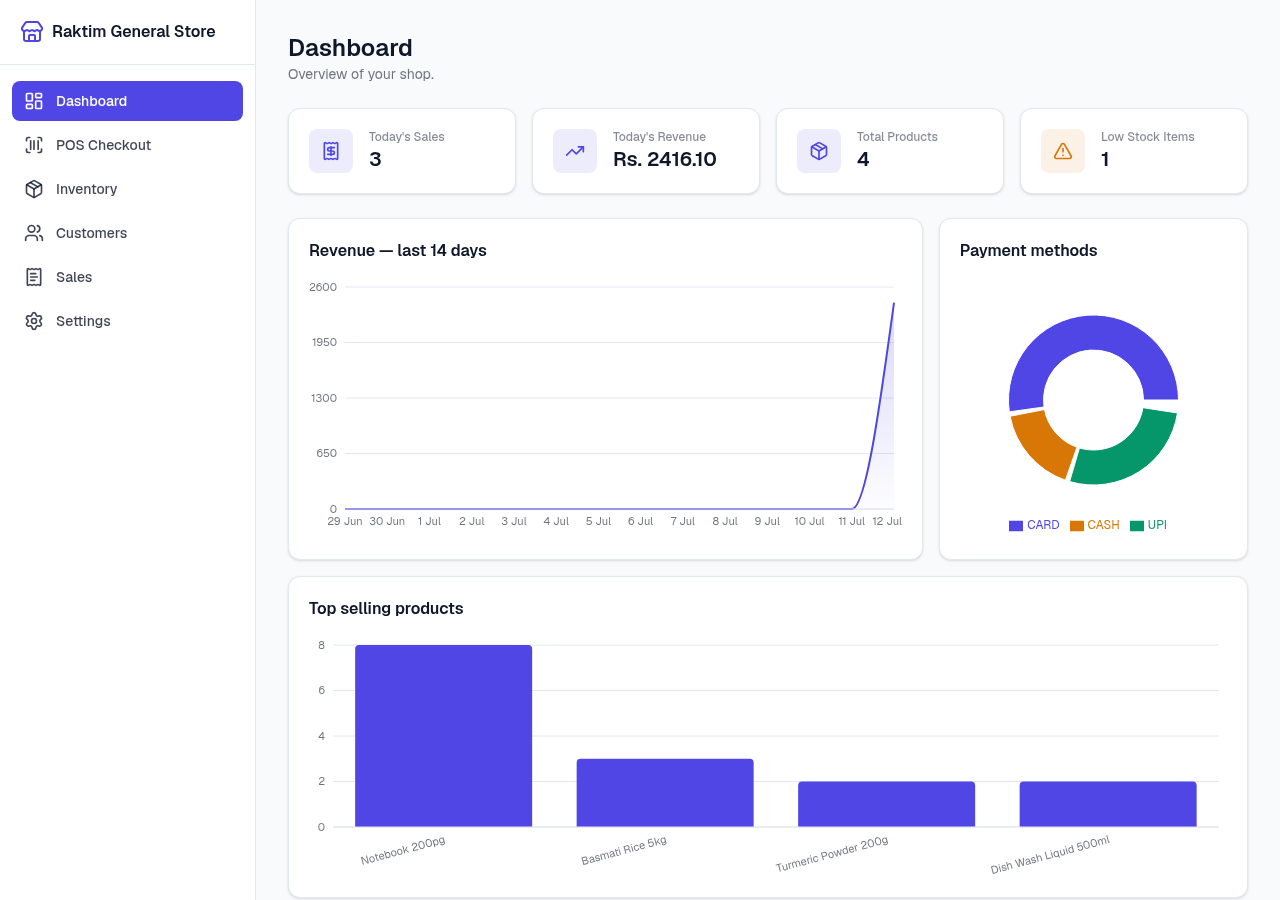
Sales dashboard — revenue, top products, payment mix
- MIT LicenseFree to use, modify, self-host
- Offline-firstZero network calls after install
- SQLite + DockerOne compose file, your data stays local
- 20+ currenciesWorks in any country, any tax system
- ESC/POS printingUSB thermal printers, no driver setup
- Open sourceMIT — fork it, own it, ship it
Everything a retail shop needs
NodeDR POS ships all the core POS features in one Docker Compose stack — no plug-ins, no paid tiers, no feature gating.
Barcode-driven checkout
Scan to add items, scan again to bump quantity, press Enter to finalize. Unknown barcodes surface a clear toast — no register blocking. Works with any USB HID barcode scanner out of the box.
GST billing & compliance
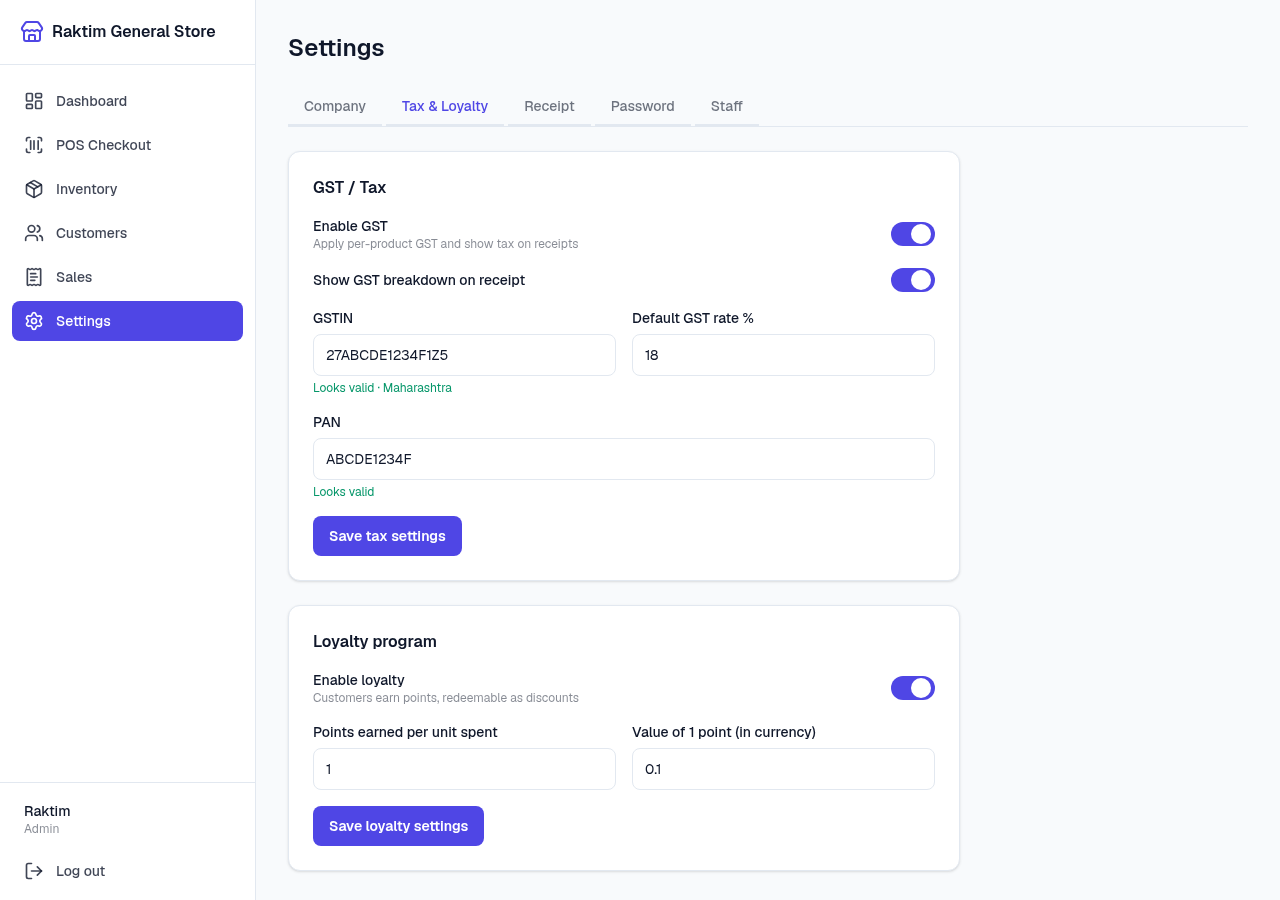
Per-product GST rates with HSN/SAC codes. MRP is treated as GST-inclusive as required by Indian law — CGST/SGST are broken out on every receipt. Live GSTIN and PAN format validation built in.
Cash, UPI & card payments
Multiple payment methods at checkout — cash (with change calculation), UPI, and card. Mixed payment is supported. Payment method mix is visible on the sales dashboard.
Thermal receipt printing
Three print paths: browser print dialog (any CUPS/OS printer), server-side PDF download, or direct ESC/POS over USB — receipt cuts off the roll without a dialog. Auto-print after every sale is one setting toggle.
Loyalty & customer dues
Customers earn points on every purchase, redeemable at checkout. Udhaar (credit) sales track dues against a customer with full payment history. Top customers ranked by point balance on the dashboard.
Offline barcode generator
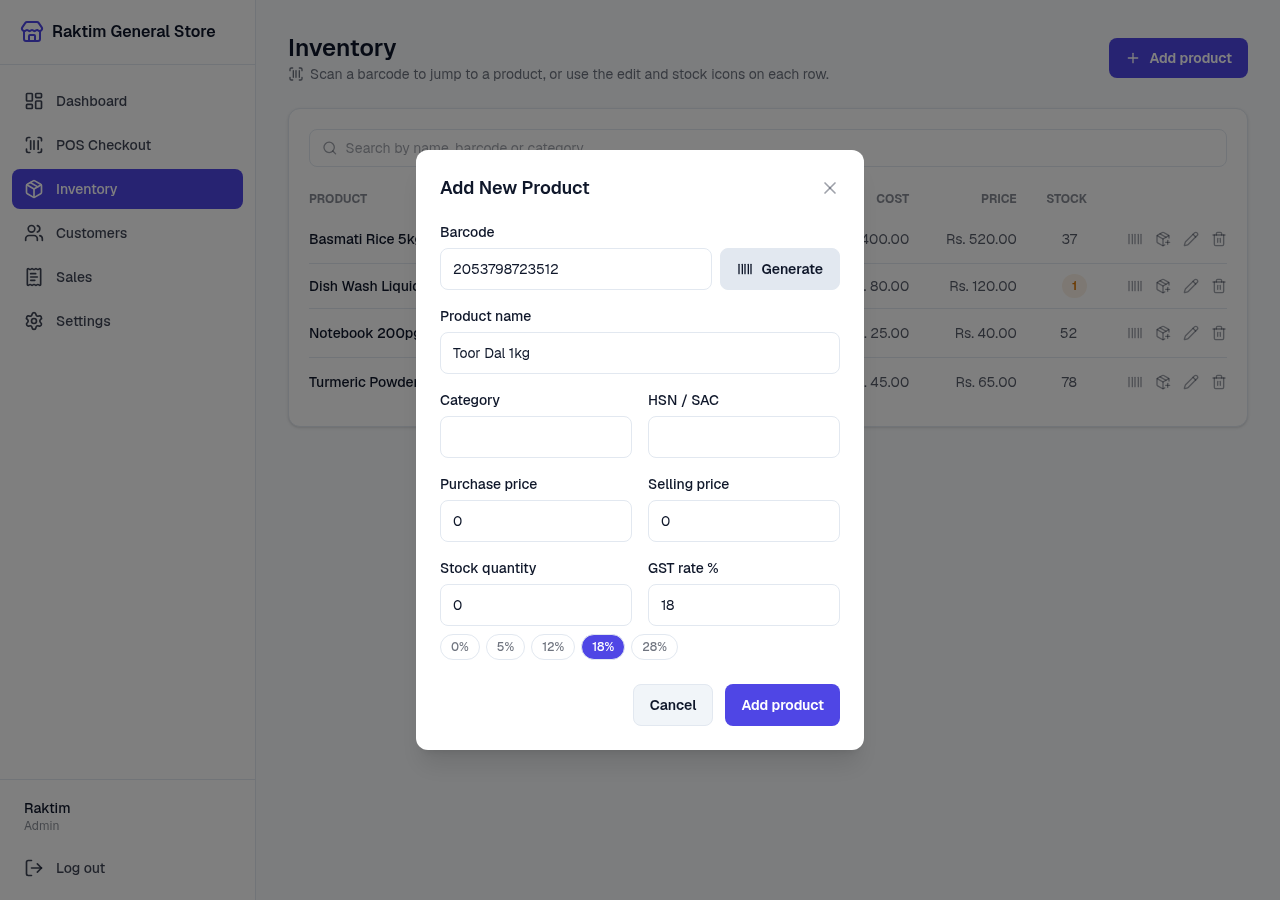
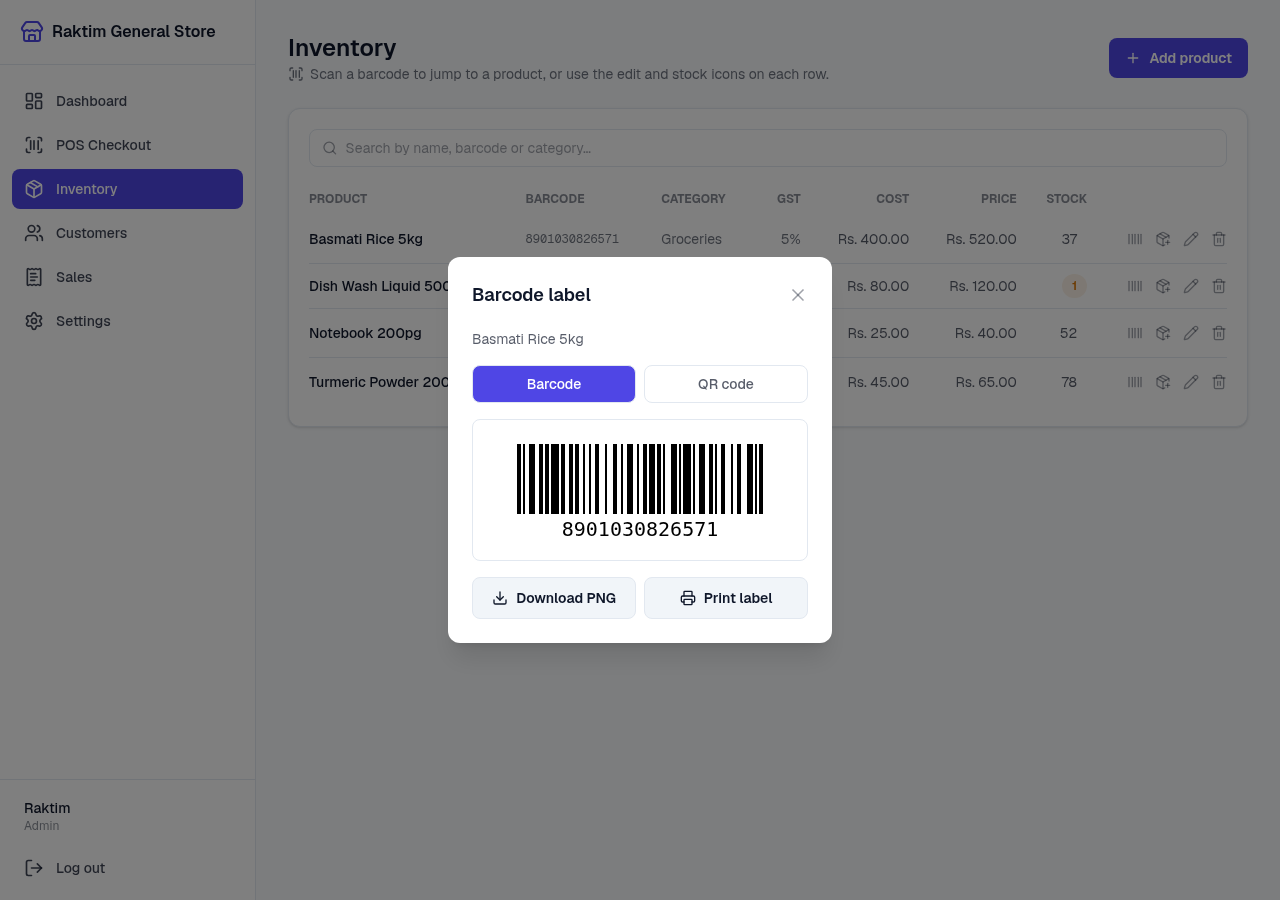
No barcode on a product? Generate a valid EAN-13 using the GS1 internal-use prefix range, or print a QR label — all client-side, no network call. Works fully offline.
Returns & exchanges
Look up any past bill by invoice number from the register, queue lines to return, and settle as a refund or fold straight into a new exchange sale. Returned stock auto-restocks. A unit can never be returned twice.
Inventory management
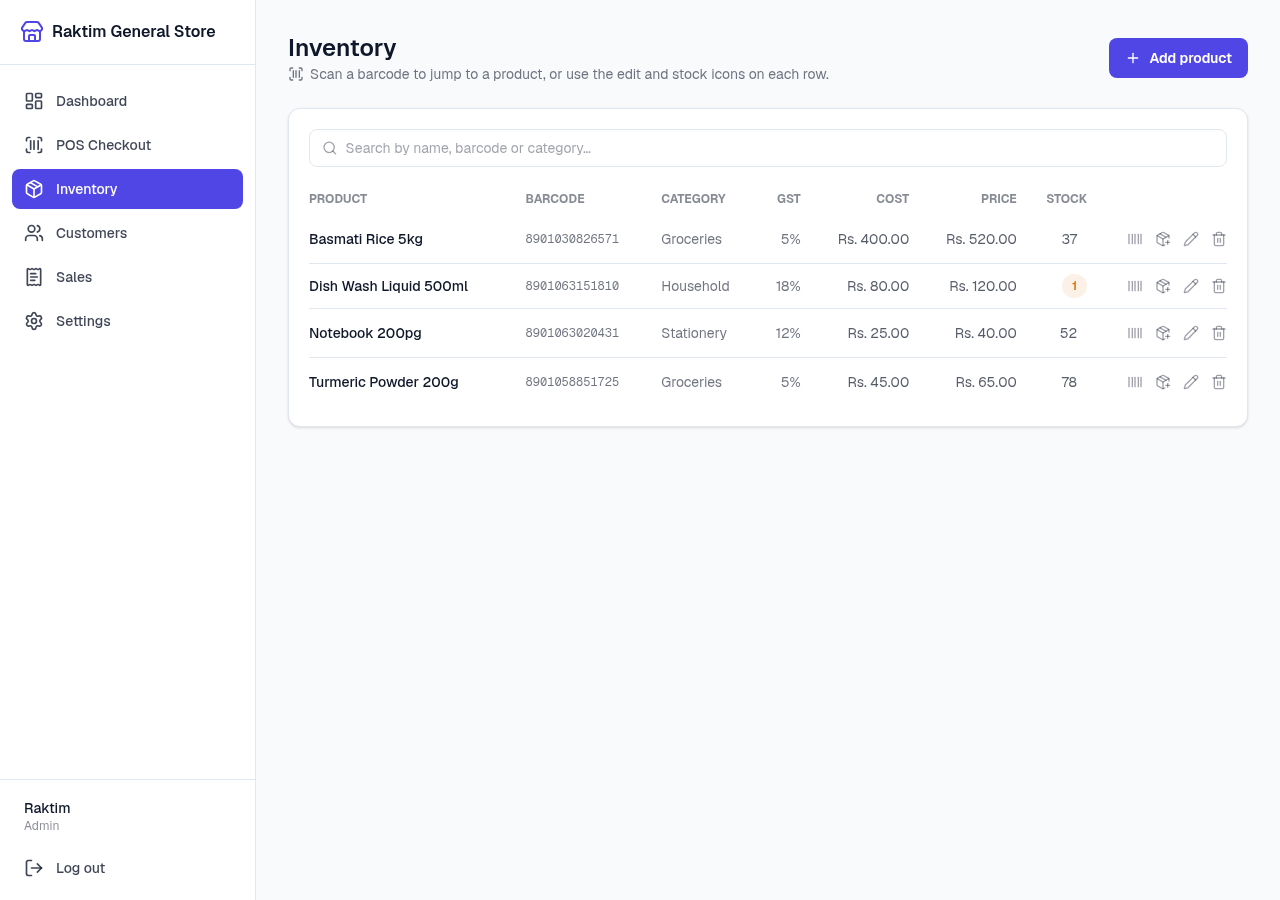
Scan to edit stock, auto-fill new product form on unknown barcode, low-stock dashboard alerts, per-product discount %, and an optional 'allow negative stock' mode to keep the register open when counts lag reality.
Sales dashboard & CSV export
Revenue trend, best sellers, payment method mix, top loyalty customers, and today's totals. One-click CSV export of full sales history. Searchable invoice history with reprint from any past sale.
Staff accounts & roles
Admin and cashier roles. Cashiers run the register; admins manage staff, settings, inventory, and exports. Bcrypt-hashed passwords and HttpOnly JWT sessions.
Works on LAN tablets & phones
Access at http://machine:1994 from any device on the shop network — the nav collapses to a slide-out drawer on mobile. No per-device install needed.
Zero external calls at runtime
Once the Docker stack is up, the app never phones home. No analytics, no telemetry, no cloud dependency. Your sales data never leaves the shop.
See it in action
Real screenshots from a running NodeDR POS instance — dashboard, inventory, barcode tools, and settings.
Built for shops everywhere
NodeDR POS supports 20+ currencies out of the box and works with any tax system — VAT, GST, sales tax, or none. Switch currency in Settings and every screen, receipt, and report adapts instantly.
+ any currency your business needs — fully configurable
Any device on your network
NodeDR POS runs in any browser — desktop or mobile. Open it from the shop computer, a counter tablet, or a phone on the same Wi-Fi. No app installation, no internet connection.
We’re building installable native apps so you can launch NodeDR POS without a browser tab or terminal — double-click to open, auto-start on boot, system tray icon.
How it works
One port exposed. The frontend proxies API calls to the backend over the internal Docker network — the backend never touches your LAN.
  Browser / LAN tablet
        │  http://<machine>:1994   (the ONLY exposed port)
        ▼
┌──────────────────────────┐  /api/* proxied server-side  ┌──────────────────────┐
│   frontend  :1994        │ ──────────────────────────▶  │  backend (internal)  │
│   Next.js / React        │ ◀──────────────────────────  │  Express + Prisma    │
└──────────────────────────┘   (internal Docker network)   └──────────┬───────────┘
                                                                       │
                                                                       ▼
                                                         SQLite  (Docker volume)
                                                         Your data never leaves
One port, one origin
Port 1994 is the only exposed port. No CORS complexity — session cookies are first-party and the API isn't exposed on your network.
LAN access built in
Any tablet or phone on the same network can open the register in a browser. No per-device app or install needed.
Data in a Docker volume
SQLite lives in the nodedr-pos_data named volume. Containers restart and rebuild; your data stays untouched.
How NodeDR POS stacks up
Versus hosted SaaS POS subscriptions and the spreadsheet-and-calculator approach.
| Feature | NodeDR POS | Hosted SaaS POS | Spreadsheet |
|---|---|---|---|
| One-time cost | Free | Monthly fee | Free |
| Works offline | |||
| Barcode scanning | |||
| GST billing (India) | Paid add-on | Manual | |
| Thermal printing | |||
| Loyalty program | Paid tier | ||
| Returns & exchange | Paid tier | ||
| Sales dashboard | Manual | ||
| Data stays on-prem | |||
| No vendor lock-in | |||
| Open source (MIT) |
Up and running in under 10 minutes
All you need is Docker. The installer handles the rest — no manual database setup, no config files to edit.
Clone and run the installer
One command clones the repo and runs the installer script. It checks for Docker, builds both images, starts the stack, and prints the URL when ready.
git clone https://github.com/Raktim94/nodedr-pos.git && cd nodedr-pos && ./install.sh
Complete guided onboarding
First launch shows a setup wizard: create your admin account, enter your shop name, address, currency, and optionally GSTIN. Takes about 2 minutes.
# Open in browser:
http://localhost:1994
Add products and start selling
Add inventory by scanning barcodes or typing. Then go to POS, scan items to add to cart, select payment method, and print the receipt. Done.
# Access from any LAN device:
http://<your-machine-ip>:1994
./install.sh — it rebuilds images and restarts the containers. Your data in the Docker volume is never touched.What’s coming next
NodeDR POS is actively developed. Here’s what’s shipped, what’s in progress, and where we’re heading.
Core POS
Shipped- Barcode-driven checkout — HID scanner support, cart management, unknown-barcode toast.
- GST billing (India) — MRP-inclusive tax, CGST/SGST breakdown, GSTIN on receipt.
- Cash, UPI & card payments — Multi-payment method with cash change calculation.
- Thermal receipt printing — Browser print dialog, server-side PDF, direct ESC/POS over USB.
- Loyalty program — Point earning, redemption at checkout, dashboard ranking.
- Customer dues (udhaar) — Credit sales, due ledger, payment history.
- Returns & exchanges — Partial returns, exchange netting, store credit.
- Discounts — Percentage or flat-amount per sale, plus a standing per-product discount % that applies automatically at checkout.
- Inventory management — Scan to edit, low-stock alerts, allow negative stock.
- Offline barcode generator — EAN-13 / QR code generation and label printing — fully offline.
- Sales dashboard — Revenue trend, best sellers, payment mix, CSV export.
- Staff accounts & roles — Admin and cashier with scoped permissions.
- Multi-currency — 20+ currencies switchable in Settings — symbol flows through the whole app and receipts.
- Customizable receipts — Set a header and footer; HTML print, server-side PDF, and direct ESC/POS USB printing.
- Customers directory — Visit counts, total spend, loyalty balances, and phone-number lookup at checkout.
- GST / PAN validation & reference data — Live GSTIN/PAN format validation; HSN/SAC, PIN code, and IFSC bulk CSV import for autocomplete.
- Guided onboarding — First-launch wizard for admin account creation and shop configuration before you see the dashboard.
- Works on any device — Responsive layout with slide-out nav — fully usable from a counter tablet or phone on the LAN.
- Docker one-command install — git clone + ./install.sh — up in under 10 minutes.
Desktop App (All Platforms)
In Progress- Electron wrapper for Windows — Native desktop app — double-click to launch, no browser needed, system tray icon.
- macOS app bundle (.dmg) — Packaged .dmg with Docker bundled. One-click install for Mac shop owners.
- Linux AppImage — Portable AppImage that works on any Linux distro without dependencies.
- Auto-start on system boot — Register as a system service so the POS is ready when the machine powers on.
- Native system tray icon — Quick access to the POS, status indicator, and restart option from the taskbar.
Payments & Integrations
Planned- UPI QR display at checkout — Generate a dynamic UPI QR code for the exact sale amount, shown on-screen for the customer to scan.
- Stripe / Square terminal integration — Real card terminal connection for markets where tap-to-pay is standard.
- WhatsApp receipt sharing — Send the receipt as a WhatsApp message to the customer's phone — no email required.
- Multi-currency sale — Accept payment in a different currency from the shop's base currency with live exchange rate display.
Reporting & Analytics
Planned- Advanced reporting module — Category-level revenue, profit margin tracking, hourly sales heatmap, daily/weekly/monthly comparisons.
- Profit & cost tracking — Add cost price per product; the dashboard shows gross margin per product and category.
- Scheduled email reports — Daily or weekly sales summary sent to the admin's email address automatically.
- GSTR-1 compatible export — Export invoice data in the format required for GSTR-1 filing (India). Similar exports for VAT returns in other regions.
- Supplier and purchase orders — Track purchase price, reorder points, and generate purchase orders to send to suppliers.
Hardware & Peripherals
Planned- Cash drawer support — Send open-drawer ESC/POS command automatically on cash sale completion.
- Customer-facing display — Second screen showing item names, prices, and total as the cashier scans.
- Weighing scale integration — Read weight directly from a USB or RS-232 scale for produce and bulk goods.
- Label printer support (ZPL) — Print product labels to Zebra / Dymo label printers using ZPL or EPL language.
- NFC / tap-to-pay reader — Read contactless card / phone payments via a USB NFC reader.
Multi-Location & Teams
Future- Multi-branch inventory — Manage inventory across multiple shop locations from a single admin panel. Stock transfers between branches.
- Optional cloud sync — Opt-in encrypted sync for multi-branch inventory and consolidated reporting — data stays on your own server, not ours.
- Role-based permissions (granular) — Fine-grained permissions: allow a cashier to apply discounts up to X%, block returns for specific users, etc.
- Shift management — Open and close cash registers by shift, track cash drawer float, reconcile end-of-day.
- Customer-facing app (PWA) — A Progressive Web App that customers can install to view their loyalty balance, receipt history, and store announcements.
- Franchise mode — Franchisor admin dashboard with read-only visibility across all franchisee branches.
E-commerce & Omni-channel
Future- WooCommerce sync — Bi-directional stock sync with a WooCommerce store — sell online and in-person from one inventory.
- Shopify integration — Sync products and orders with Shopify. Use NodeDR POS as the in-store terminal for a Shopify brand.
- QR-code menu for restaurants — Generate a QR code that customers scan to view your product catalog or place an order (dine-in / pickup mode).
- Click-and-collect — Accept online orders for in-store pickup with status updates and barcode-based collection confirmation.
Want to shape the roadmap?
Open a feature request on GitHub or contact us — community feedback drives what gets built next.
NodeDR POS is made and maintained by NODEDR INFOTECH PRIVATE LIMITED. It is free, open-source software released under the MIT License — you can use it, fork it, and run it commercially with no restrictions.
Official website: www.nodedr.com
Common questions
Ready to run your shop for free?
One command. Your own machine. Your data stays where it belongs — with you.